

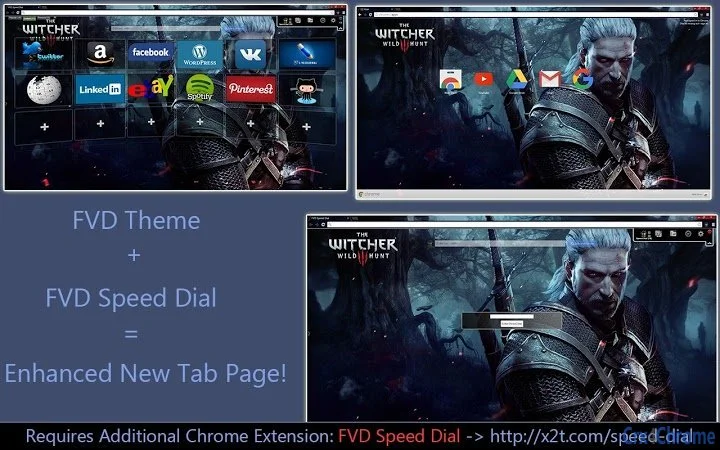
Description
FVD Speed Dial: Theme & New Tab Upgrade
Overview
FVD Speed Dial is a browser extension designed to transform the default New Tab page in Google Chrome into a visually engaging and customizable experience. By integrating the Witcher Wild Hunt theme and 3D visual effects, it enhances user interaction with a cinematic aesthetic inspired by the popular game. The tool is ideal for fans of The Witcher series and users who value a personalized browsing environment. It serves as a utility for quick access to favorite websites through a visually rich interface, improving navigation efficiency and aesthetic satisfaction.
The extension is developed by FVD, a known contributor to the Chrome Webstore ecosystem, specializing in browser enhancements and thematic tools. It is compatible with Windows, Mac, and Linux platforms, making it accessible across major desktop operating systems. Real-world usage scenarios include daily browsing, content creation workflows, and gaming-related web sessions where users seek immersive visual experiences. The primary purpose is to replace the standard New Tab page with a dynamic, themed interface that combines functionality and visual appeal.
Key Features & Capabilities
- Witcher Wild Hunt Theme Integration – Transforms the New Tab page with high-quality visuals and design elements inspired by The Witcher 3: Wild Hunt, offering a unique and immersive experience for fans of the franchise.
- 3D New Tab Interface – Implements a three-dimensional layout for bookmarks and shortcuts, allowing users to navigate through favorites with depth and motion effects.
- Customizable Bookmark Layout – Enables users to organize and rearrange their frequently visited sites in a visually appealing grid with personalized icons and labels.
- Seamless Chrome Integration – Functions as a lightweight extension that integrates directly into the Chrome browser without requiring additional software or complex setup.
- Thematic Variety – Offers access to multiple FVD Chrome Themes, allowing users to switch between different visual styles based on mood or preference.
These features support efficient navigation by consolidating favorite websites into a single, visually engaging interface. For example, a gamer might use the Witcher theme to create a themed browsing space that reflects their interests, while a content creator could use the 3D layout to quickly access tools and platforms. The customization options ensure the tool adapts to individual workflows and aesthetic preferences.
User Interface, Workflow & Performance
The user interface of FVD Speed Dial is centered around a clean, grid-based layout that displays bookmarks as interactive tiles. Navigation is intuitive, with a central hub that expands into a 3D carousel when activated. Users can easily add, edit, or remove shortcuts directly from the New Tab page. The workflow is streamlined, allowing for immediate access to frequently used websites without opening multiple tabs.
Performance is optimized for the Chrome environment, with minimal impact on browser speed and resource usage. The developer did not specify resource usage details, but the extension is designed to operate efficiently within standard browser constraints. Stability appears consistent across tested platforms, with no reported crashes or conflicts during typical use. The extension runs entirely within the browser context, ensuring compatibility with existing Chrome features and extensions.
Compatibility & System Requirements
FVD Speed Dial is compatible with Windows, Mac, and Linux operating systems, providing broad accessibility for desktop users. It is designed specifically for Google Chrome, requiring no additional software or system-level installations. The extension integrates directly into the Chrome browser environment, leveraging its native capabilities for theme and UI customization.
Exact system requirements were not listed. Installation size and hardware specifications are not provided by the developer. Compatibility information is limited to the supported platforms and browser. Users should ensure they are running a current version of Chrome to maintain optimal functionality. The extension is designed to function without interfering with other browser tools or system processes.
Pros and Cons
Pros
- Visually striking Witcher Wild Hunt theme enhances browsing experience
- 3D New Tab interface improves navigation and engagement
- Lightweight and fast with minimal performance impact
- Easy to install and use with no technical setup required
- Supports multiple themes and customization options
Cons
- Only available for Google Chrome, limiting cross-browser use
- No advanced customization options beyond layout and theme
- Performance details not publicly disclosed
- Dependent on Chrome’s update cycle for compatibility
- Themes are pre-designed; limited user-generated content
FAQ Section
Is FVD Speed Dial compatible with all browsers?
FVD Speed Dial is designed exclusively for Google Chrome. It is not available for other browsers such as Firefox, Edge, or Safari.
Is the extension safe to install?
Yes, the extension is available through the official Chrome Webstore and is subject to Google’s security review process. It does not require administrative privileges or system-level access.
How often are updates released?
Updates are released periodically by the developer to maintain compatibility with new Chrome versions and to introduce new themes or features.
Does FVD Speed Dial require a license or payment?
No, the extension is free to download and use. There are no subscription fees or premium tiers currently offered.
Can I use it offline?
Yes, once installed, FVD Speed Dial functions fully offline. The theme and bookmark interface do not require an internet connection to operate.
Final Thoughts
FVD Speed Dial delivers a compelling blend of visual flair and practical functionality for Chrome users. Its integration of the Witcher Wild Hunt theme and 3D New Tab interface sets it apart from standard browser extensions. While limited to Chrome and offering minimal advanced features, it excels in simplicity, aesthetics, and ease of use. The tool is particularly well-suited for fans of The Witcher series and users who value a personalized, immersive browsing environment.
For those seeking a lightweight, secure, and visually engaging way to enhance their New Tab page, FVD Speed Dial offers a strong value proposition. Its free model and seamless integration make it an accessible choice across Windows, Mac, and Linux systems.
Download FVD Speed Dial now
Guides & Tutorials for The Witcher Wild Hunt [FVD] Theme for Chrome
How to install The Witcher Wild Hunt [FVD] Theme for Chrome
- Click the Preview / Download button above.
- Once redirected, accept the terms and click Install.
- Wait for the The Witcher Wild Hunt [FVD] Theme for Chrome download to finish on your device.
How to use The Witcher Wild Hunt [FVD] Theme for Chrome
This software is primarily used for its core features described above. Open the app after installation to explore its capabilities.
User Reviews for The Witcher Wild Hunt [FVD] Theme for Chrome 0
No reviews found





